Fragment route
Where to find Repair Tool fragments in Subnautica 2
Bring a Scanner, a good oxygen margin and a Seaglide or other fast movement option. The three documented early scans form a triangle around the Lifepod: Chap's Base to the southeast, a wreck directly south and a second wreck to the northeast. Early Access updates can change layouts, so confirm each landmark and room description rather than relying on coordinates alone.
Chap's Base desk — southeast
Travel roughly 220 meters southeast and descend about 40 meters to the small cave base at the foot of a stone pillar. The first fragment is on a desk inside the habitat, on the same early route as Chap's black box.
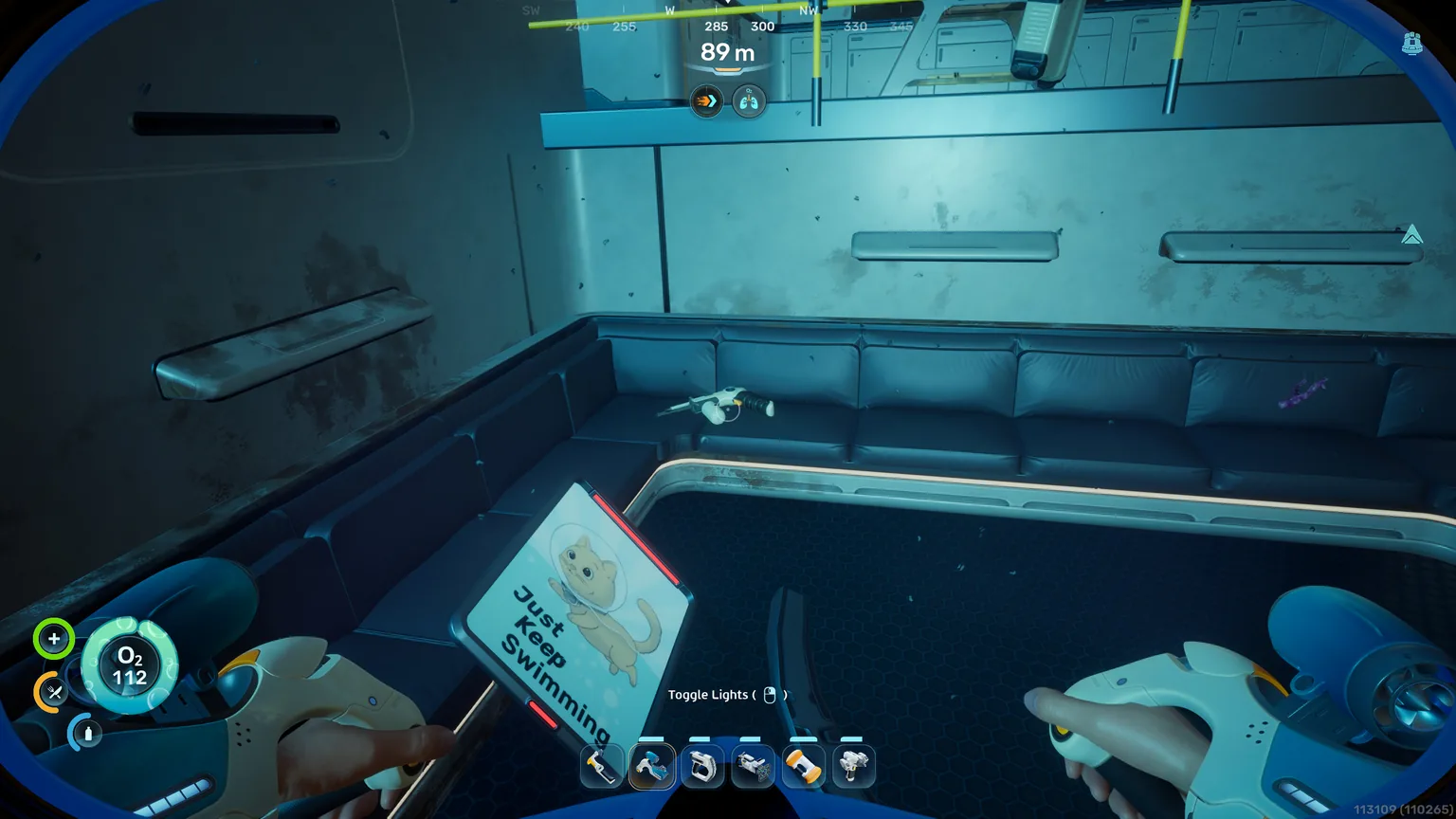
South wreck sofa
Swim roughly 300 meters directly south across the deep gap. Enter through the small opening on the south side, pass through the hole in the floor and scan the Repair Tool fragment resting on the sofa.
Northeast wreck locked door
From the Lifepod, follow roughly 60 degrees northeast for about 380 meters. Enter the wreck from underneath and scan the fragment on the floor beside the locked door; this wreck also contains other valuable blueprints.
More than three fragments exist, and current guides document additional wreck, bunker and Tadpole Pen spawns. Scan any convenient duplicate, but check the current patch and use the three routes above as a practical early sequence.
Blueprint unlock
Scan three fragments before gathering the full recipe
The Repair Tool cannot be fabricated until its blueprint is complete. Treat the scan route as a separate objective: confirm the blueprint first, then collect the exact materials. This prevents the common mistake of carrying sulfur and copper back to a Fabricator only to discover that the recipe is still locked.
| Goal | Action | Result |
|---|---|---|
| Start the blueprint | Scan the first Repair Tool fragment | Blueprint progress appears in the PDA |
| Complete the blueprint | Scan three fragments total | Repair Tool recipe becomes available |
| Avoid wasted scans | Check the progress indicator after each fragment | You know whether another room is still required |
| Preserve oxygen | Mark Chap's Base and surface between rooms if needed | Safer route with fewer emergency exits |

Crafting
Subnautica 2 Repair Tool recipe
After unlocking the blueprint, use a fully functional Fabricator. The current recipe is one titanium ingot, one wiring kit, one basic battery and one sulfur. Early Access sub-recipes and resource routes can change, so verify every component in your current Fabricator menu.
| Material | Quantity | Where to get it |
|---|---|---|
| Titanium ingot | 1 | Craft from titanium using the current Fabricator sub-recipe |
| Wiring kit | 1 | A silver-related crafted component; confirm the current sub-recipe |
| Basic battery | 1 | Craft with the materials shown by the current Fabricator |
| Sulfur | 1 | Follow a current route in hot or volcanic areas |
Do not rely on older recipes that list silicone rubber, crystalline sulfur or a fixed two-silver requirement. Early Access crafting can change, so use the current in-game sub-recipes for the wiring kit and battery.
Practical uses
What can the Repair Tool repair?
The tool is valuable because it restores progression assets instead of merely improving collection speed. Keep it charged and carry it when exploring damaged structures or using the Tadpole in risky caves.
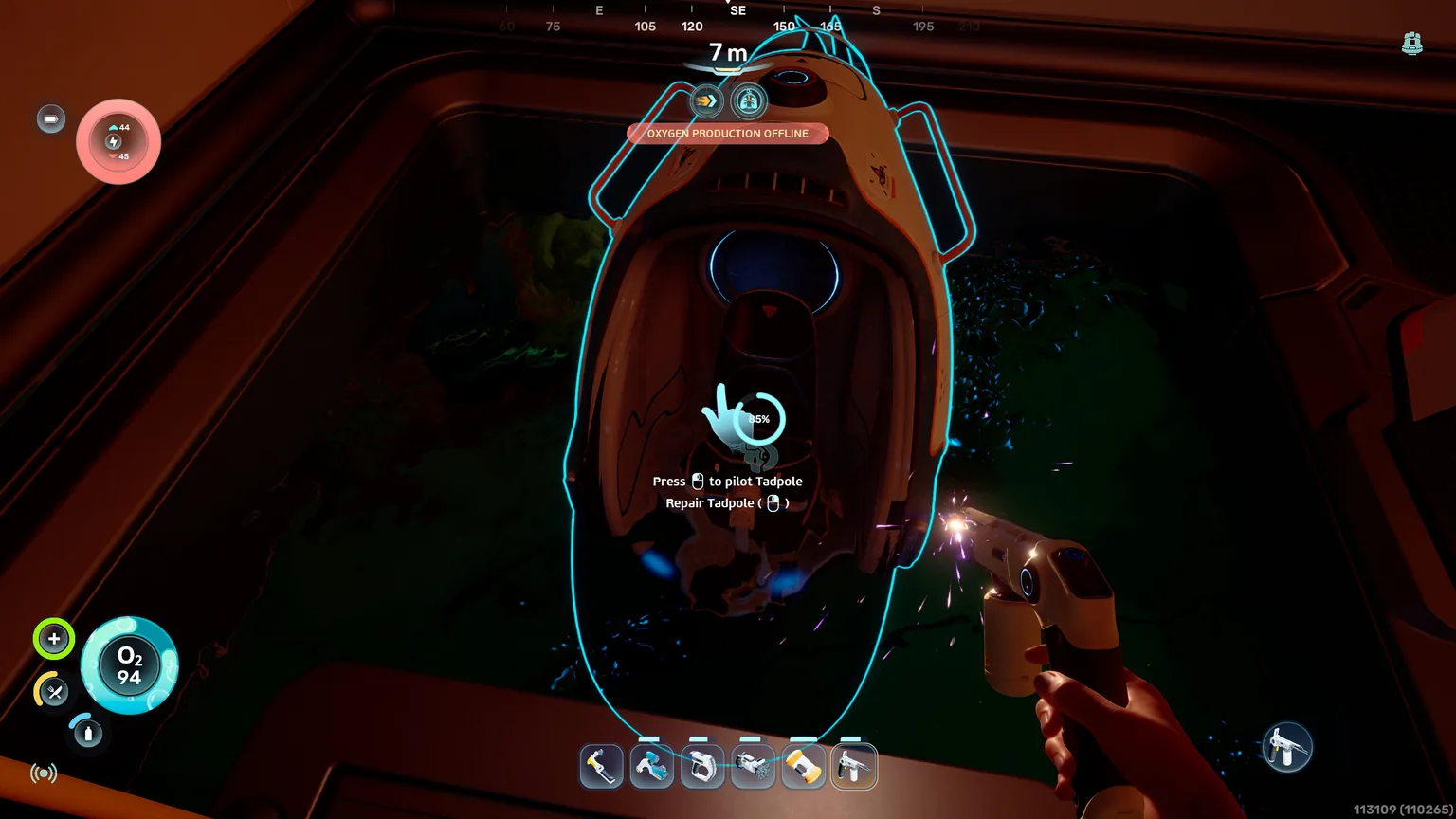
Repair the Tadpole
Aim at a damaged section until the repair interaction appears, then hold the input while the integrity percentage rises. Stop if environmental danger makes the repair position unsafe.
Restore damaged base modules
After collisions, attacks or environmental damage, inspect the module surface for the repair prompt. Fix breaches before adding more power or storage.
Progress through damaged equipment
Some wreck or story interactions may require restored equipment. Keep the Repair Tool available instead of storing it permanently at the starting base.
Can the Repair Tool fix the Tadpole?
Can the Repair Tool fix the Tadpole?
Troubleshooting
Why the Repair Tool route or recipe is not working
Most failures come from incomplete scanning, entering the wrong wreck, or following an older recipe that lists silicone rubber or crystalline sulfur.
| Problem | Likely cause | Fix |
|---|---|---|
| Recipe is missing | Fewer than three fragments were scanned | Complete the Chap's Base, south wreck and northeast wreck scans, or use another current duplicate spawn |
| Fragment is not on the sofa | You are in the wrong wreck, the spawn changed, or it was already scanned | Check the wreck roughly 300 m south, then use another documented wreck, bunker or Tadpole Pen spawn |
| Cannot find sulfur | Following an old crystalline-sulfur guide or an outdated route | Look for ordinary sulfur using a current hot or volcanic-area route and verify your patch |
| Tadpole will not repair | Wrong aim point, no damage, or unsafe interaction angle | Move around the hull until the repair prompt and integrity indicator appear |
| Guide coordinates look different | Early Access terrain or wreck placement changed | Use compass direction, distance and room landmark together, then check current patch notes or another recent spawn |
FAQ
Subnautica 2 Repair Tool FAQ
Where is the Repair Tool in Subnautica 2?
A practical three-scan route checks the desk inside Chap's Base about 220 meters southeast, the sofa in the wreck about 300 meters south and the floor by a locked door in the wreck about 380 meters northeast.
How many Repair Tool fragments do I need?
You need three fragment scans to complete the blueprint. Check the PDA progress after every scan because Early Access builds may move individual spawns.
What is the Repair Tool recipe?
The current recipe uses one titanium ingot, one wiring kit, one basic battery and one sulfur at a fully functional Fabricator.
How do I get sulfur?
Follow a current sulfur route in hot or volcanic areas and verify the location against your patch. The recipe calls for ordinary sulfur, not crystalline sulfur.
Can the Repair Tool fix the Tadpole?
Yes. Aim at a damaged section of the Tadpole and hold the repair input when the prompt appears. The integrity indicator should increase while the tool is working.